
Do you still remember every detail of a hearing from a year ago?
Refresh your memory of any hearing.
Attesta opens the court's .dcr recording on your own computer and turns it into a transcript you can search.
Attesta: from the Latin attestari, to bear witness or to confirm.
A hearing transcript you can search and listen to.
Before a cross-examination, a meeting with your client or the next appearance.
Search the whole hearing
A name, a word, a date. Straight to the line, and to the court reporter's bookmarks.
Click to hear that second
Every line is tied to its time in the recording.
Who said what
Speakers told apart by voice. Hear how a witness answered, and judge their credibility, not only what they said.
Confidence colours
Words the engine was unsure of are coloured, so you know where to listen again before relying on a line.
Opens .dcr directly
.dcr is Liberty's own format. Attesta reads it as it is. MP3, WAV and M4A too.
Interpreted hearings
A witness answering through an interpreter is written in their own language, as said.
Who said what, and when.
Each turn has its speaker and its time in the recording. Go back, hear how the witness or the other side answered, and judge their credibility for yourself.
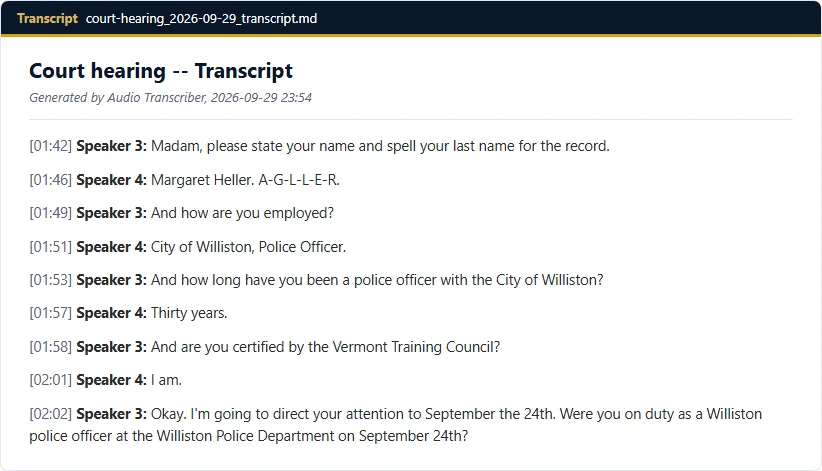
From a public practice hearing used for testing.
Did you know you can ask for the recording?
In Ontario, as counsel of record, you can ask the court for the digital audio recording of your hearing. Four steps:
- Fill in the counsel request form and undertaking (PDF, ontariocourts.ca).
- Send it with the court's fee (about 22 to 23 dollars for the first day) to the court office where the hearing took place.
- The recording usually arrives as a .dcr file.
- Open it in Attesta. You get a transcript you can skim, search, and use to prepare your case.
Lawyers tell us it takes about five minutes to fill in, and the court often sends it within a day.
No court order is needed for counsel of record in most matters. Family matters in the Superior Court need a judge's authorization first, and some proceedings are never released.
The court's own undertaking lists "replacing or supplementing notes" as a permitted use. That is what Attesta is for.
A working copy for your own review. Not for filing or use in court. When you need an official record, order the certified transcript.
Search it, click it, hear it.
What happens to a recording in Attesta. The official transcript is optional.
The audio stays on your computer.
Stays with you
- The recording, transcribed here and never uploaded.
- The transcript, the documents and the history.
- Nothing is sent to us. No usage reporting.
Leaves only if you ask
- Only for an AI summary, and only the transcript text, to the AI provider you choose.
- For a court recording, the app warns first.
Have these problems? Questions?
Talk to us, or try Attesta on one of your own hearings.